Thursday, 16 February 2017

Querying data in Microsoft Dynamics CRM 2016 using Web API


Introduction:

With Microsoft Dynamics CRM 2016, Web API that was in Preview for CRM 2015 is now GA. Web API is really ODATA v4 which is the later version of ODATA v2 that was implemented in earlier versions of CRM until CRM 2015.
With CRM 2016, ODATA v2 is deprecated, this means that though the legacy code written using ODATA v2 will continue to function, it is not advised to continue to develop using this version of ODATA starting CRM 2016.
The earlier version of ODATA was strictly restricted to CRUD operations, how with Web API you can even perform operations that earlier required us to use SOAP requests.
In the earlier post, it was all about executing FetchXML queries using Web API, well that was to some extent because I didn’t have much success querying and applying some very common queries. After spending some more time with WEB API and trying to get things done exclusively using ODATA v4, I did get quite a few things figured out.
In this post, I am listing out some of the frequently used queries and how these could be generated using Web API.
ODATA v4 endpoints:
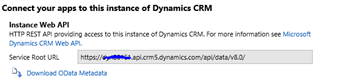
Under Developer Resources you can now find the endpoint for web api
Querying data in Microsoft Dynamics CRM 2016
Notice the change in the URL structure, it is now /api/data/v8.0/
Earlier it was /xrmservices/2011/organizationdata.svc/
Sample Queries:
  1. List accounts starting with A and C
    var qry = “accounts?$filter=startswith(name,’A’) or startswith(name,’C’)”;
    Since field names have not been specified all the columns are listed.
    The entitycollection does not include Set Prefix anymore besides its using the logical name throughout.
  2. List accounts owned by a particular user
    var qry = “accounts?$select=name,accountnumber,_primarycontactid_value,createdon,accountcategorycode,revenue&$filter=_ownerid_value%20eq%201ea6fc32-9b2d-47e6-b9ab-b5f23f69e34f “;
    Here we had to provide the guid of the user that you need to filter by. Also notice that the ownerid attribute has been mentioned as _ownerid_value
    All lookups are listed in the query result to follow the naming structure
    _<logicalname>_value.
  3. Read account details along with the primary contact phone.
    We need to use the $expand clause to request data of related entity. However it appears that the $expand clause only works when requesting data of a single record as shown in the below query.
    var qry = “accounts(4ef2c099-bca1-e511-80de-3863bb349a78)?$select=name,accountnumber,_primarycontactid_value,createdon,accountcategorycode,revenue&$filter=contains(name,'(sample)’)&$orderby=name&$expand=primarycontactid($select=fullname,telephone1)”
    If you were to request this for the entire accounts collection, you receive the following error message
  4. List all Phone Calls of an account
    This will display only the subject of the related phone calls.
    var qry = “accounts(4ef2c099-bca1-e511-80de-3863bb349a78)?$expand=Account_Phonecalls($select=subject)”
Understand the Query Results
Unlike the ODATA v2 queries, the results here are returned in JSON format
Now if see the results here, the primary contact id only provides the Guid, not really helpful, and for currency data types, it again returns only the number, the currency is provided as transaction guid, so again formatted value missing.
If we want the results to return the formatted values, we need to pass the following in the header tag of the request
odata.include-annotations=”OData.Community.Display.V1.FormattedValue”
I haven’t figured it out how to pass these in the browser url, but here is the code I use to pass the header values.
In the above code you can replace the “*” with “OData.Community.Display.V1.FormattedValue”, the other preferences supported are
Microsoft.Dynamics.CRM.lookuplogicalname
Microsoft.Dynamics.CRM.associatednavigationproperty
Generally for lookups, we are used to receiving 3 set of data,
The lookup entity name, the guid and the record name. By default we only received the Guid of a lookup field, if we need the record name and the entity name, we need to include the preferences listed above.
If you want all preferences to be applied pass “*”
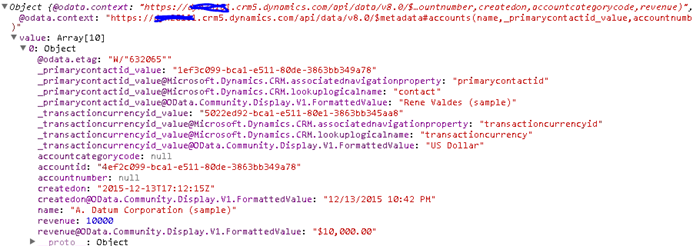
With all preferences the applied the result would appear as
Querying data in CRM 2016 using Web API
Lookup field details are available as shown above
_primarycontactid_value: “1ef3c099-bca1-e511-80de-3863bb349a78″
_primarycontactid_value@Microsoft.Dynamics.CRM.associatednavigationproperty: “primarycontactid”
_primarycontactid_value@Microsoft.Dynamics.CRM.lookuplogicalname: “contact”
_primarycontactid_value@OData.Community.Display.V1.FormattedValue: “Rene Valdes (sample)”
And we now also get the revenue formatted with the currency symbol and the date.
Paging
To handle paging you need to specify the page size, which is now called odata.maxpagesize=n
N stands for the count of records to be returned.
You also receive the paging cookie, which will allow you to request the next set of records.

 Web API
Use the nextlink url to the Web API to request the next set of data. It returns a fully qualified url with the query parameters set that can be used just as is.
Result Count
When you include the $count=true in your query, you get the total count of the records returned by the query in the query result.
If you query the following,
var qry5 = “https://xxx.crm5.dynamics.com/api/data/v8.0/accounts?$count=true&$top=2″
You get

Querying data in Dynamics CRM 2016 using Web API
The total count is 19 even though the results requested were only top 2
Note, if there are more than 5000 records that the query returns, the count here would still return 5000 only.
Conclusion
The Web API query still has a few limitations and like the earlier ODATA v2 there are limitations on what kind of data can be queried. You can find the complete list here
In this post I have covered queries, in the later blogs hope to cover the other operations supported by WEB API.
Make your Dynamics CRM life easy with Inogic Dynamics CRM Solutions. Read more about our add-ons here.

Sunday, 1 January 2017

Building micro services using Service Fabric - Basics


How to :Definition of  Microservices:

Today’s Internet scale services are built using microservices. Example microservices are protocol gateways, user profiles, shopping carts, inventory processing, queues, caches, etc. Microservices can further be defined by:

⦁ Is (logic + state) independently versioned, scaled, and deployed
⦁ Has a unique name that can be resolved
⦁ Interacts with other microservices over well-defined interfaces like REST
⦁ Remains logically consistent in the presence of failures
⦁ Hosted in a container (code + config)
⦁ Can be written in any language or framework

How to:Build Complete Technology Stack using Microservices:

Implement Self-Hosting with ASP.NET 5 Web API
Running ASP.NET 5 on top of Azure Service Fabric is the best fit for building microservices because Service Fabric lets you deploy any number of services into each node/VM, which allows for high microservices density per cluster. ASP.NET 5 also provides exciting features such as the following:
Flexible hosting: You can now host your ASP.NET 5 application on IIS or in your own process. Hosting in your own process is fundamental in Azure Service Fabric.
Web API, MVC and Web Pages: These are all merged together, simplifying the number of concepts.
Full side-by-side support: ASP.NET 5 applications can now be installed on a machine without affecting any other applications on the machine that might be using a different .NET Framework version. This is a huge feature for IT management.
Cross-platform support: ASP.NET 5 runs and is supported on Windows, Mac OS X and Linux.
Cloud-ready: Features such as diagnostics, session state, cache and configuration are designed to work locally and in the cloud (like Azure) with no changes.

Using “MVC-Type” Web Apps and Service Fabric Microservices
ASP.NET MVC is a very popular framework for traditional Web sites, but you cannot use the “old” MVC framework (MVC 5 or older) with Service Fabric. This is due to the fact that in Service Fabric you need to self-host the HTTP listener in your process and that OWIN/Katana is not supported in ASP.NET 4.x MVC (It’s supported only in ASP.NET 4.x Web API.) Therefore, the options you have to implement an “MVC-type” Web application on Service Fabric services are the following:

Use MVC 6 in ASP.NET 5 to self-host the HTTP listener within your Service Fabric microservices process. It supports MVC because in ASP.NET 5, Web API and MVC are consolidated and are in fact the same framework with the same controllers with no dependency to IIS. This will be the preferred choice as soon as ASP.NET 5 is released to manufacture.
Use ASP.NET 4.x Web API with OWIN/Katana to self-host the HTTP listener within your Service Fabric microservices process and simulate MVC controllers with Web API controllers and use HTML/JavaScript output rather than regular Web API content (JSON/XML). The documentation page at bit.ly/1UMdKIf demonstrates how to implement this technique.


What are the building Blocks of Microservices with Azure service Fabric:

Stateful Microservices in Azure Service Fabric

Support for stateful services is an exciting and important component of Azure Service Fabric. It’s also complex and wide-ranging enough that exploring stateful services goes beyond the scope of this article, but we’ll briefly explain what it is. Look for a follow-on article focused on this area of Service Fabric in a future issue.

A stateful microservice in Service Fabric collocates compute and data, with the state placed within the microservice itself (both in-memory and persisted on local disk). The reliability of state is achieved through local persistence and replication of data to other nodes/VMs. Basically, each data partition has several replica services associated with it. Each replica can be deployed in a different node/VM to provide high availability should the primary replica go down. This is similar to how Azure SQL Database works with database replicas, because it’s based on Azure Service Fabric.

In complex and scalable applications, stateful services simplifies the architecture and reduces the number of components compared to a traditional, three-tier architecture that needs to use external cache and queues. When using stateful services, the benefits of a traditional external cache is now intrinsic in the stateful service. Additionally, external queues aren’t needed because we can imple­ment internal queues within the Service Fabric microservices.

When using stateful services, it automatically creates hot backup secondaries that can pick up the operations from the same point where a primary left off following a hardware failure. Many times services have to scale to continue to meet the demands of a growing user base, requiring the addition of hardware to the running environment. Service Fabric uses features such as partitioning so that services can be built in a way that they automatically spread over onto new hardware without requiring user intervention.

Stateful Azure Reliable Services provide a host of capabilities, including data partition support, replica support and leader election, replica service naming, and service address discovery from the gateway service. It also provides management of concurrency and granularity of state changes using transactions, the ability to maintain consistent state replication, and the use of reliable, distributed key/value collections (Reliable Dictionary and Reliable Queue). The good news is that Service Fabric handles the complexity and details of these topics for you, so you can focus on writing applications.

Reliable Actors Services in Azure Service Fabric

Azure Service Fabric Reliable Actors is an actor programming model for Service Fabric. It provides an asynchronous, single-threaded actor model. An actor represents a unit of state and computation. In some ways it’s similar to the open source software project “Orleans” created by Microsoft Research. The important point is that Service Fabric Reliable Actors API is based on the underlying infrastructure provided by Service Fabric.

Implementing actor-instances for Internet of Things (IoT) devices is a good example of actor services usage. A Vehicle-Actor type in the form of a C# class would encapsulate the IoT vehicle domain logic plus its live states like GPS coordinates and other data. Then, we would have potentially millions of actor objects or instances of that mentioned class, distributed across many nodes in the cluster.

Of course, actors are not limited to live IoT objects­—they could be used for any subject, but “live IoT objects” is a great didactic scenario.

Actors are distributed throughout the cluster to achieve high scalability and availability and are treated as in-memory objects in every cluster’s VM. They are also persisted on local disk and replicated through the cluster.

The actors are isolated single-threaded objects that encapsulate both state and behavior. Every actor is an instance of an actor type, similar to the .NET code shown here:

// Actor definition (State+Behaviour) to run in the back end.
// Object instances of this Actor class will be running transparently
// in the service back end.
public class VehicleActor : Actor<Vehicle>, IVehicleActor
{
  public void UpdateGpsPosition(GpsCoordinates coord)
  {
    // Update coordinates and trigger any data processing
    // through the State property on the base class Actor<TState>.
    this.State.Position= coord;
  }
}
Next, the following code shows example client code to use the actor via a proxy object:

// Client .NET code
ActorId actorId = ActorId.NewId();
string applicationName = "fabric:/IoTVehiclesActorApp";
IVehicleActor vehicleActorProxy =
  ActorProxy.Create<IVehicleActor>(actorId, applicationName);
vehicleActorProxy.UpdateGpsPosition(new GpsCoordinates(40.748440, -73.984559));
All the communication infrastructure is taken care of under the hood by the Service Fabric Reliable Actors framework.

You could have millions of VehicleActor objects running on your cluster across many different nodes/VMs, and Service Fabric would be taking care of the required plumbing, including partitions and replicas where your millions of actors are spread and balanced.

The Actors client API provides communication between an actor instance and an actor client. To communicate with an actor, a client creates an actor proxy object that implements the actor interface. The client interacts with the actor by invoking methods on the proxy object.

For the scenarios where actors fit, it greatly simplifies the microservices implementation, especially when compared to stateful reliable services where you have more control but need to implement a lot of plumbing related to partitioning data, partition addressing, replicas and the like. If you don’t need fine-grain control, then you can avoid the extra work by using Reliable Actors.

Angular Tutorial (Update to Angular 7)

As Angular 7 has just been released a few days ago. This tutorial is updated to show you how to create an Angular 7 project and the new fe...