Friday, 5 January 2018

Entity Framework Core with Angular 2


Let’s start how to work with entity framework Core with Angular 2 and ASP.NET Core 2.0.

Download Sample Project “Entity Framework with Angular 2 and ASP.NET Core 2.0”

Step # 1 – Create a New Project

If you don’t know how to create a new project using Angular2 and ASP.NET Core 2.0, then Click here or click below link to learn how to create a new project.

Step # 2 – Create Models

In this step, we will create a model class (Student.cs) with some properties like StudentID, Name, Email, and Department. Now let’s start how to create a class.
  • First of all, Create a new folder. Open the terminal, run the command “mkdir Models”. It will create a new folder in your project folder structure.
  • Now, right click on the Model folder => select new C# class => enter name (E.g. Student.cs). It will create a new class. Now enter the following properties in this class.
Note:- If you don’t see “New C# Class” after right clicking on the Model folder, then you need to install some C# extensions. Open your VSCode and press “ctrl+shift+x”, It will open a sidebar with search box. Just write C# classes. Then you will see a list on extensions with green color button “Install”. Just press install button and extension will be installed.
Entity Framework Core Model Properties
Note: – Don’t forget to add the below reference above the class.
using System.ComponentModel.DataAnnotations;

Step # 3 – Adding Entity Framework Core.

In this step, we will add entity framework in our project. As you know in visual studio IDE, we use package manager console for adding packages, but there is no package manager Console. So, we need some commands to install entity framework in our project.
  • First of all, right the below command in terminal to add package. It will add package in your project.
dotnet add package Microsoft.EntityFrameworkCore.SqlServer
Note: – when you will execute the dotnet add package command, then It will add an entry to csproj file.
  • Now run the below command in terminal to restore all the packages.
Dotnet restore
  • Install Entity Framework Command Line Tool.
Go to project folder structure => Open .csproj file => add the following code just below the ItemGroup end tag.
Entity Framework Core adding command line tool
  • Then again restore all the packages.
Run the command (“dotnet restore”) in terminal.
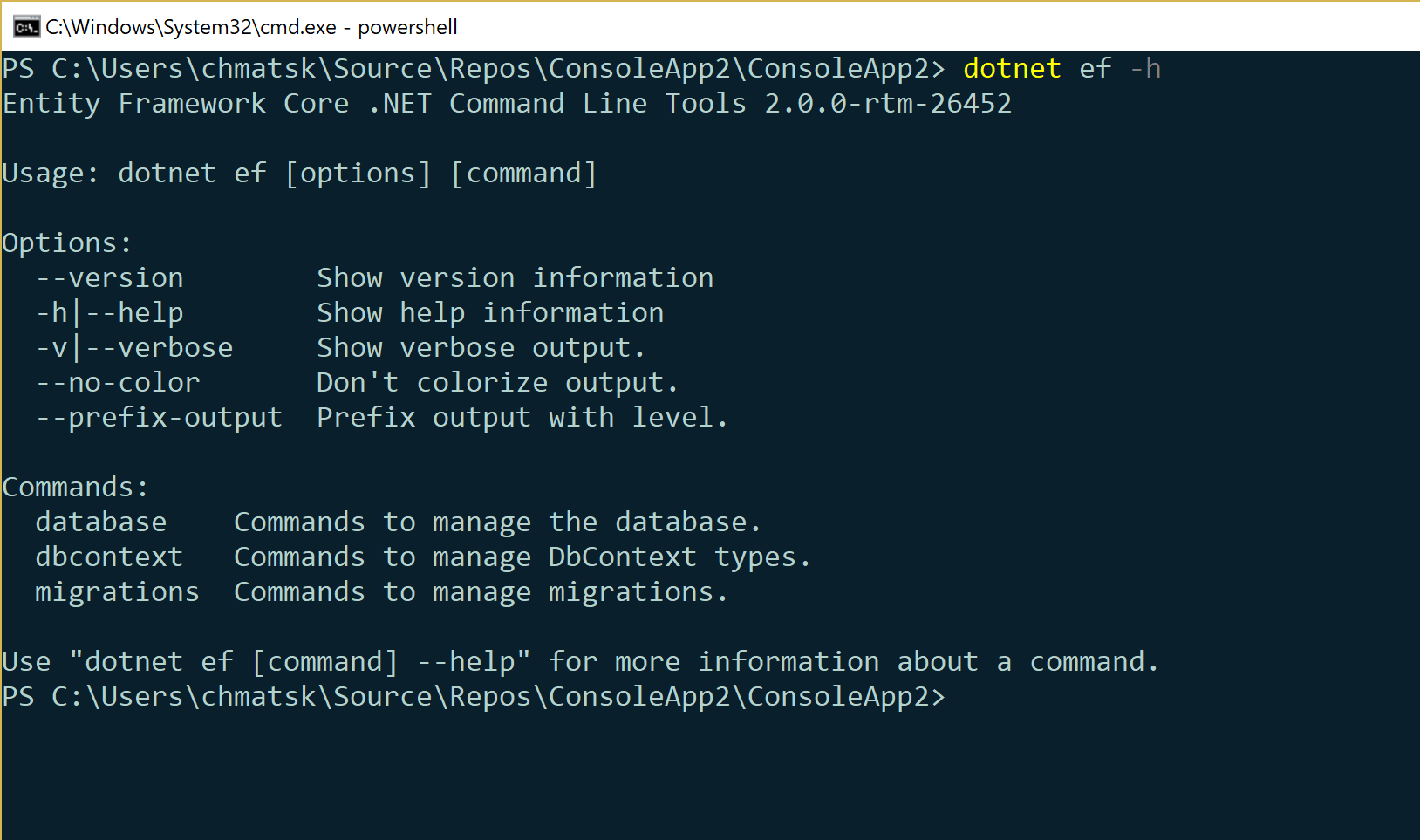
Note:- if you want to see all the available commands, then write this command “dotnet ef” in terminal. It will show all the commands. And moreover, if you want to use dotnet migration command, but don’t know how to use this command, then just write this command (“ dotnet ef migrations –help ”). It will show details of migrations command. And moreover, if you want to use “add” command and need some help, then write this command (“dotnet ef migrations add –help”). And so on.

Step # 4 – Create a DbContext class.

In this step, we will add a DbContext class. First of all, we will make a folder (E.g. Persistence), and then add a class with the name of StudentDbContext.cs. So, let’s start,
  • run the command “mkdir persistence”, It will add the folder with the name of “persistence”.
  • Right click on the “persistence” folder => choose “new C# class” => enter the name StudentDbContext.cs. It will add a new class under the folder persistence.
  • Write the below code.
Entity Framework Core Adding DbContext class
Note: – Don’t forget to add below DbContext reference library.
using Microsoft.EntityFrameworkCore
  • Now go to project folder structure and open startup class. Add the below code just under the ConfigureServices method.
Entity Framework Core Adding Config Services
Note: – Add below libraries.
using Microsoft.EntityFrameworkCore;
using myFirstApp.persistence;
  • Add Configuration.
Open appsettings.json file => then add connection strings as below in screenshot.
Entity Framework Core ConnectionString

Step # 5 – Creating Database.

Now it’s time to create database using code first.
  • Add DbSet<> into StudentDbContext class as below in screenshot.
Entity Framework Core Adding DbSet
  • Now add migration. Just run this command “dotnet ef migrations add initialModel”. It will add the migration folder into your project.
Entity Framework Core Adding Migration
  • Now finally, run this command “dotnet ef database update” to update database. It will create a database in your sql server. Now open sql server, then you will see a database with the name of students.
Entity Framework Core Database

Download Sample Project “Entity Framework with Angular 2 and ASP.NET Core 2.0”

New Capabilities in Entity Framework Core 2.0


Entity Framework has for quite some time been Microsoft's flagship ORM and is quite popular within the Microsoft development community. It is an extended object relational mapping (ORM) tool from Microsoft that has become increasingly popular over the past few years. The primary goal of the Entity Framework was to raise the level of abstraction and simplify development of data-aware applications with reduced effort and reduced KLOC (thousands of lines of code).
Entity Framework has been updated over the last few years and is now a mature ORM. With the advent of .NET Core, Microsoft also has come up with a version of this ORM that is compliant with the .NET Core platform. This is what we call Entity Framework Core; the most recent version of it is Entity Framework 2.0. This article presents a discussion on all the new features and enhancements in Entity Framework Core 2.0.

Pre-requisites

To run .NET Core 2.0 applications in your system, you should have the .NET Core 2.0 SDK installed in your system. You can download a copy of .NET Core 2.0 SDK from this link.
If you want to work with Entity Framework Core 2.0, besides having .NET Core 2.0 installed, you also should have Visual Studio 2015/2017 installed in your system. To install Entity Framework Core 2.0, you can take advantage of the Package Manager Console Window within the Visual Studio IDE. Here's the command you can use to install Entity Framework Core 2.0:
  1. PM> Install-Package Microsoft.EntityFrameworkCore.SqlServer
  2. -Version 2.0.0
It should be noted that SQLServer, SQLLite, and the in-memory database providers for Entity Framework Core 2.0 are already available as part of ASP.NET Core 2.0. So, you would not have to install the Entity Framework Core 2.0 database provider via NuGet if you are using ASP.NET Core 2.0.

So, What's New in Entity Framework Core 2.0?

This section lists the new features and enhancements. Entity Framework Core 2.0 can be used with .NET Standard 2.0. This implies that you now can target a wide variety of platforms, devices, and applications. Some of the existing new features and enhancements in Entity Framework Core 2 include the following:
  • Support for the Like Query Operator
  • Support for Global Query Filters
  • Support for DbContext Pooling
  • Support for Table Splitting

Support for the Like Query Operator

You now can take advantage of Like() in a LINQ query when working with Entity Framework Core 2.0. Here is an example:
  1. var authors =
  2. from a in context.Authors
  3. where EF.Functions.Like(c.FirstName, "J%");
  4. select a;

Support for Global Query Filters

Support for Global Query filters is another new feature added to Entity Framework Core 2.0. This feature allows you to specify filters in the model so that they will be automatically applied to all the entities of a particular type. Here is an example that illustrates how this can be used:
  1. modelBuilder.Entity<Author>()
  2. .HasQueryFilter(a => !p.IsDeleted);
When the preceding is applied as a Global Query filter, the following code snippet can be used to retrieve all author records that are not deleted.
  1. var result = context.Authors
  2. .Include(a => a.Authors)
  3. .FirstOrDefault(a => a.Id == id);

Support for DbContext Pooling

Support for DbContext pooling is a feature that you can take advantage of to improve performance. This feature enables you to configure the service registration of the DbContext instance so that you can re-use the pre-created instances in lieu of creating them again and again. In other words, DbContext pooling is a feature that allows you to configure service registration such that you can achieve a performance boost by re-using a pool of pre-created instances. The following code snippet illustrates how this can be used:
  1. services.AddDbContextPool<AuthorsContext>(
  2. options => options.UseSqlServer(dbConnectionString));

Support for Table Splitting

With Entity Framework 2.0, you can write more efficient queries and defined child entities that can group properties within entities. In essence, table splitting enables you to map two or more entity types to the same table with the primary key column(s) being shared.

Summary


Entity Framework Core 2.0 is the latest version of Microsoft's flagship ORM that is targeted at the .NET Core Framework. This article presented an overview on the new capabilities in Entity Framework Core 2.0 with relevant code examples. Happy reading!

Scaffolding DbContext and Models with EntityFramework Core 2.0 and the CLI

EF Core 2.0 has been out for a few weeks now. If you're looking at an ORM for your .NET application then EF Core should be at the top of the list of possible options. I say at the top and not the only one because depending on the project requirements, some features may be missing. For example, EF Core cut ties with .edmx so if you want to stick with the designer feature you will need to use EF6. There are other limitations so make sure you have a look at this post for API changes in 2.0 and also at the list of providers that may or may not be supported yet.
If EF Core fits your needs, then you're up for a treat, considering that it comes with significant performance improvements, smaller footprint and a lot of cool features to help you get your Data Access Layer (DAL) set up quickly. In most cases, you will use the Code-First approach, especially if it's a new project with no back-end. There are though those cases that you may already have a database in place. You don't want to hand-roll your models, definitely not! So how would you do it?

USING THE EFCORE TOOLS AND CLI TO SCAFFOLD YOUR CODE

EF Core comes with an awesome CLI that can help you manage many aspects of EF Core in your project. You can have a look at all the available CLI options in the official docs - here.
The EF Core tools run in the context of the dotnet CLI.
Note: At the time of writing this post there's a known with support for .NETStandard 2.0. To work around it, you'll need to multitarget against .NET Core 2.0 or the full .NET Framework to allow the CLI commands to execute on your project correctly.
To scaffold an existing database you need to ensure that you've installed the appropriate NuGet packages. I'm using a Console App for this example so I don't have to worry about the issue I described above with NETStandard 2.0. On you project, you can either use the NuGet package manager or fire up the command line, navigate to your project and type the following commands:
dotnet add package Microsoft.EntityFrameworkCore -v 2.0.0
dotnet add package Microsoft.EntityFrameworkCore.Design-v 2.0.0
dotnet add package Microsoft.EntityFrameworkCore.SqlServer-v 2.0.0
dotnet add package Microsoft.EntityFrameworkCore.Tools.DotNet-v 2.0.0
We also need to edit the *.csproj file to enable the CLI tool integration. Open the .csproj file and add the following:
<ItemGroup>
<DotNetCliToolReference Include="Microsoft.EntityFrameworkCore.Tools.DotNet" Version="2.0.0" />
</ItemGroup>
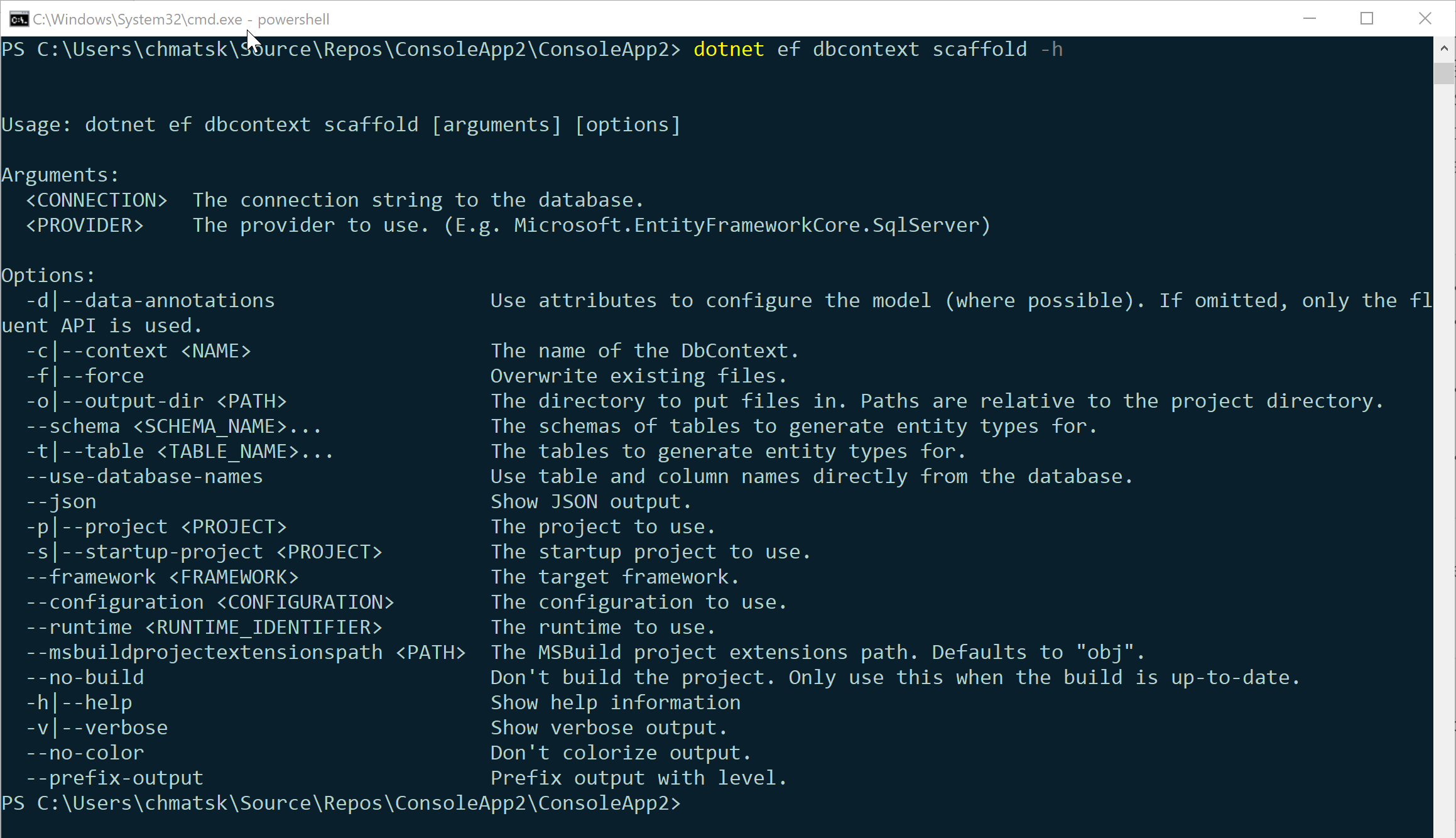
Now we're ready to scaffold our code. In the command line, you can see the full list of options available when scaffolding from an existing database using the following command:
dotnet ef dbcontext scaffold -h
An example I used to scaffold an AdventureWorks database deployed on Azure SQL is provided below:
dotnet ef dbcontext scaffold "Server=tcp:<myAzureSQLServer>.databa
se.windows.net,1433;Initial Catalog=<MyDB>;Persist Security Info=False;User ID=<myDBAdmin>;Password=<myDBPassword>;Multipl
eActiveResultSets=False;Encrypt=True;TrustServerCertificate=False;Connection Timeout=30;" Microsoft.EntityFrameworkCore.
SqlServer -o Models -f -c DemoDbContext
Dissecting the command:
  • ConnectionString (the Azure SQL connection string)
  • Provider (sql server in this instance)
  • -o for the output directory (Models)
  • -f to override previous auto-generated code
  • -c the name of the DbContext to use in the application
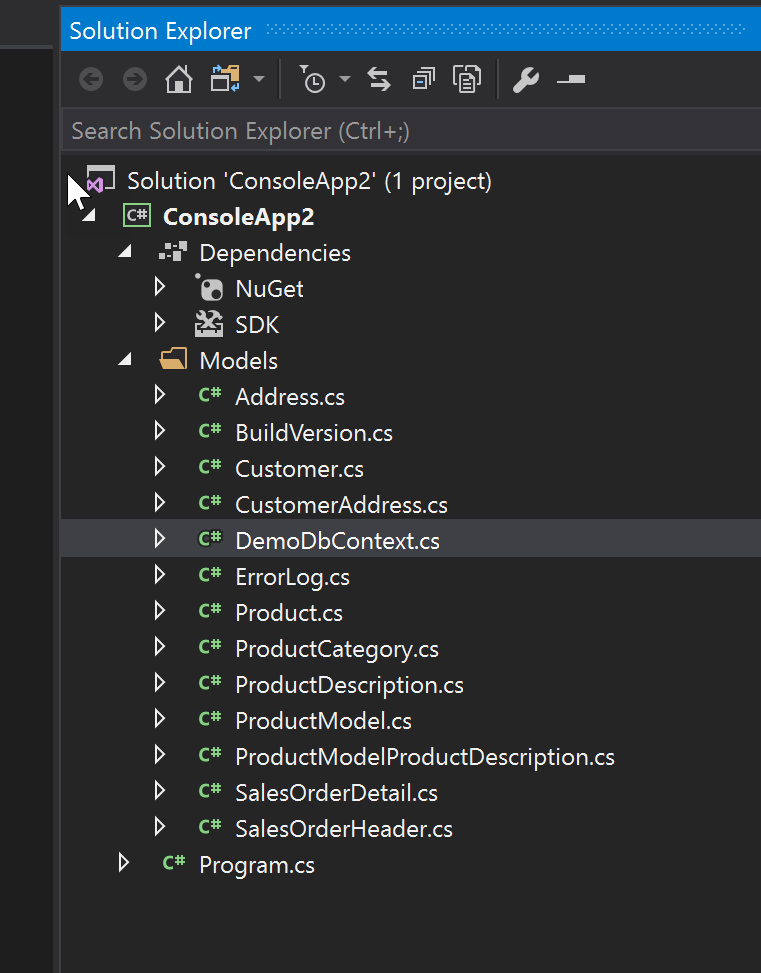
This resulted in the following code inside my project:
At this point I can instantiate the DemoDbContext in the application and start interacting with the database. As you can see, it took a couple of commands to install the NuGet packages, expose the EF CLI tools to the dotnet CLI context and scaffold the code from the existing codebase.

The past, present and future of EF Core

The past, present and future of EF Core

entity-framework-transition
Entity Framework 1 was introduced back in 2008 with .NET 3.5 Service Pack 1. During the same time, LINQ to SQL also came out, but Microsoft didn’t consider it to be an Object-Relational Mapper (O/RM). Unlike Entity Framework, LINQ to SQL was only meant to support SQL Server.
It featured both LINQ, a brand new toy back then – and something called Entity-SQL, an object-oriented SQL-alike dialect that never really caught up. It had features like multiple inheritance strategies, compiled queries, explicit loading, change tracking and other features that are commonly expected from an ORM. It was based on a provider model, so in theory it was able to support any relational database for which there was an ADO.NET Provider. Visual Studio could reverse-engineer a database and produce a model for it.
However it was received with mixed feelings.
On one end, it was good to see Microsoft having a go at ORM, but there were already other products that could do the same and more. NHibernate had been around for some time and was quite popular back then.
The problems with LINQ to SQL were:
  • Although it was touted that it supported other databases, it really only worked well with SQL Server
  • It was complex to configure in Visual Studio – let alone XML configuration
  • Entities had to inherit from a base class
  • The generated SQL was far from optimal
Some developers even issued a vote of no confidence (http://efvote.wufoo.com/forms/ado-net-entity-framework-vote-of-no-confidence) to show how bad they felt about it.
The second version, now bumped to v4 to align with the release of .NET 4 in 2010 improved it a bit – with self-tracking entities with an eye for WCF, lazy loading, initial support for Plain-Old CLR Objects (POCOs), but people were still unsatisfied, even though it was then Microsoft’s recommended database access technology.
It was only with version 4.1, popularly known as Code First, which happened in 2011, that things started to look interesting.
Entity Framework went through a big refactor, it seemed much more polished and clean, fully embracing POCOs and was code-centric.
It was now much easier to start working with. Almost no mapping and configuration was required as it was based on conventions – things just worked out of the box. The version was somewhat misleading, as it seemed to be a whole new version, but underneath, the “old” Entity Framework was still there.
Another version 4.3, came out shortly which featured migrations, a welcome addition, but not one without its problems.
Then came version 5, bringing support for enumerated and spatial types and table-valued functions, and was released in the same year, 2012.
Finally, version 6 brought most of the stuff that mature ORMs support, such as interceptors, logging capabilities, custom conventions, support for stored procedures and asynchronous methods.
Life was good in 2013!
But then Microsoft started working on something new, and this had a profound impact on Entity Framework.
Enter .NET Core!

Entity Framework Core

ef logo
.NET Core was in the forge for several years, and it’s not hard to understand why.
Put it simply, Microsoft wanted to rewrite its framework from scratch, make it open-source and support operating systems other than Windows – not something to be taken lightly!
Of course, Entity Framework had to be re-implemented as well, and Microsoft took the opportunity to do things right this time.
EF Core, as it is now called, was totally rewritten, but tried to stay close to Code First.
Because it was a massive task, a roadmap was defined for its features, but from the start, a couple of them were received with lot of interest:
  • It would work on all operating systems (Linux, Mac) and platforms (Windows Phone, Windows Store) supported by .NET Core
  • Non-relational databases would also be supported, making it not just an ORM: Azure Table Storage and Redis were the first to be announced
  • Fully extensible and provider-based
The Entity Framework Core team reunites regularly and makes available a summary of their decisions. Interested folks can submit issues and participate in the discussions, but of course, the last word belongs to Microsoft.
EF Core 1 was eventually released in 2016, followed by version 1.1 the same year, but it was far from what was expected.

EF Core – The good bits

The good about it was:
  • Brand new code base, with most types public and following best practices, all available in GitHub
  • It did work on operating systems other than Windows and on platforms other than PCs
  • Almost infinitely extensible
  • Support for providers other than SQL Server (SQL Server Compact Edition, SQLite, InMemory, PostgreSQL, MySQL, DB2, MyCat, Oracle)
  • A simplified API that is close to the previous one (Code First)
  • New features: shadow properties, ability to mix SQL with LINQ, transparent client-side function evaluation, high-low identifier generation, batching of queries, improved SQL generation
EF Core v2.0 has just been released and it brought along other interesting features, chief among them are global queries (very handy for multi-tenant and soft-deletes), owned types (complex values) and a limited form of support for database functions.
To summarize, EF Core 2 is pleasant to use. It’s easy to get started with.
The shortcoming needs some explaining.

EF Core 2.0 - Shortcomings

1. One of the more appealing new features was the ability to target non-relational databases.
It seems like a great idea – just use the same APIs and LINQ to work with potentially any kind of data source imaginable.
The problem is, this is yet to be seen, as no such provider was actually released – if you don’t consider InMemory of course! The code is nowhere to be found on GitHub and we have no idea of what it will be like, when (if?) it is actually released.
2. Microsoft boasts about improvements in the SQL generation in EF Core, but a crucial feature such as support for grouping (LINQ’s GroupBy operator) is not supported yet – or worse, it does not fail, yet silently does it all in memory, with possibly a tremendous impact on performance.
Unaware developers may have a bad time with this, and there is no easy solution to it, essentially because it is not possible to project to non-entity classes yet.
3. Worse, it is not possible to perform date and time operations with LINQ, and lots of SQL standard mathematical operators are also missing. Version 2 brought support for LIKE, but that’s it.
4. Lazy loading is a feature that people are expected to use, but alas, it is not here. Version 1.1 brought explicit loading, and eager loading was here since version 1, but it’s still surprisingly absent.
5. No many-to-many collections and no inheritance strategies, only single table inheritance.
6. Migrations are here already, but a missing feature is database initializers or the capability to seed the database. We have to rely on custom SQL for that, which is at least cumbersome, when we’re talking about an ORM.
7. No interception capabilities exist yet, meaning, it’s very difficult to modify a query before it is actually executed. No out of the box way to delegate entity creation and initialization.
8. The ability to use stored procedures for Create-Update-Delete (CUD) operations is also not yet implemented. It is possible to use stored procedures for querying, though.
9. It is not possible yet to plug our own custom conventions.
10. Spatial types are absent too, but enumerations and complex types are now supported.
11. Also, no support for System.Transactions (aka, TransactionScope) and distributed transactions. I guess we can understand that since the first steps were to get this running on Linux and Mac, for which there is no Microsoft Distributed Transaction Coordinator (MS DTC), this is a feature that people are used to.
12. Finally, still no Visual Studio (VS) integration. It is not possible to reverse-engineer a database from inside VS or to apply database migrations, except of course, using Package Manager.
From what I mentioned, it should be clear that EF Core is not ready for enterprise-level usage, in fact, Microsoft even says that on the Roadmap page.
It is obvious that EF Core is new and Microsoft hasn’t had the time to implement everything, but some of the absences – grouping, date/time and mathematical operations, lazy loading – are hard to understand.
Also, developers had shown a deep interest for non-relational providers and these are conspicuously absent.

Alternatives to EF Core

nhibernate
There are few full-featured ORMs that can work with .NET Core, one of which is LLBLGen Pro, but it is a commercial product.
NHibernate still does not target .NET Core or .NET Standard, and by the looks of things, it will take a long time until it does. Dapper, the micro-ORM, is already available for .NET Core, but it is not a full-featured product. Clearly, there is no free cross-platform alternative to EF Core yet, so with all its shortcomings, it’s probably your best option for now.
If we are to compare Entity Framework Core vCurrent with another well-established O/RM, NHibernate, we can see that EF is still behind in a number of features including:
  • Lots of identifier generation strategies
  • Different collection types, including collections of primitive types
  • Database-independent dialect for querying and doing batch updates (HQL)
  • Support for non-trivial mapping scenarios
  • Lazy properties
  • Type conversions
The problem with NHibernate currently seems to be the lack of interest from the community, even if some of its features are still ahead of its competitors.

What’s Next

The Entity Framework Core Roadmap page (https://github.com/aspnet/EntityFrameworkCore/wiki/Roadmap) details what are the features that will be implemented in the next version, 2.1.
We can see that some of the missing features I highlighted – grouping, lazy loading (probably), System.Transactions, lifecycle events – are already there/planned, plus a few others like support for Oracle and Cosmos DB.
It is possible that things are going in the right direction. There are however some features, like mapping strategies, concrete table inheritance and class table inheritance, who don’t seem to be attracting a lot of interest from the community. So probably these will not be around for quite some time.
We, as developers, have a saying in this, however Microsoft this time seems to be listening to the community, so it’s our responsibility to bring our concerns to them, and contribute to their resolution.

Conclusion

Entity Framework Core is cool because it can run on any of the .NET Core supported platforms and it offers some interesting features over the previous, pre-Core, versions.
It is quite new, so it is still lacking lots of stuff, but since the community is helping, these features may actually be implemented sooner than one would think.
I think EF is getting interest from developers, although people were somewhat unhappy with the absence of some functionality that are deemed essential by some. For now, as there is no clear alternative for multi-platform work, you may want to give it a try.

Angular Tutorial (Update to Angular 7)

As Angular 7 has just been released a few days ago. This tutorial is updated to show you how to create an Angular 7 project and the new fe...