Blog about MVC pattern and nice articles on asp.net MVC, spring MVC, code igniter etc. Mainly would like to to Post/Repost lot of optimization and good coding practices articles and tutorials. To make it simple, It is site for learning how to design Technical stack with latest technologies.
For any training meterial on any of the posts or Video Trainig contcat 0426622462 or dasaradhkk@gmail.com
I have a very simple answer to this burning question – because it is built by the same people who built Angular 1.
Have you considered why TypeScript has been successful even while coming from Microsoft? Because it is designed (and built) by Anders Hejlsberg, the language designer of C#. But why is C# successful – because Anders also designed Turbo Pascal. But why was Turbo Pascal successful – OK, let’s stop here, we are going way too far down the rabbit hole.
Yes, it is that simple. The same team that built Angular 1 is working on 2, and they are bringing all their hard-learned knowledge with them. They are not going to repeat their mistakes.
The team is also entirely dedicated and open to the community. First, they are posting everything they are doing in the weekly meeting notes. Second, they are collaborating closely with the community to deliver integration with two widely popular frameworks for mobile app development – Ionic (for hybrid) and NativeScript (for native).
Why is Angular 2 the future?
Allow me to list the items that I personally believe are done well in Angular 2.
SIMPLE, BUT NOT SIMPLISTIC
Angular 2 framework is simpler than Angular 1 and has far fewer concepts, making it easier to understand. But being simple does not mean that it is less powerful – just the opposite.
For example in Angular 2 everything is encapsulated in a Component, no need for Controller because the Component acts as one. No need for$scope or ViewModels. Even the View can be embedded in theComponent using decorators and multi-line strings.
Here is a definition of a simple Component in Angular 2 (written in TypeScript):
The @Component decorator defines a selector that matches the messenger tag similar to ng-controller in Angular 1. The component’s view defined in @View will be bound and inserted in the elements matched by the selector. The binding context used when generating the view is theCompoment itself, so its properties are accessible in the Mustache template defined in the @View.
MOBILE FIRST
Angular 2 is designed from the ground-up for mobile and optimized for memory efficiency and less CPU cycles. It has first-class support for touch events and gestures that work across all devices. All the benchmarks that Angular team is exercising are public and part of the GitHub repo, so everyone can look at them and even run them locally.
The route configuration is streamlined and each route maps to aComponent. If you want to dive deep into 2.0 routing, I would recommendthis session from the recent AngularConnect conference.
The router itself is even backported to Angular 1.
DEPENDENCY INJECTION
Another building block that has improved is the Dependency Injection. Let’s look at the following example:
Using TypeScript’s type annotation makes obsolete the need for “magic” strings. Combined with the declarative nature of decorators, we end up with something that we can easily reason about.
Another great feature of the Dependency Injection system is that it ishierarchical. This is especially useful when we have complex Componenttrees and want a clear separation between component boundaries.
DATA-BINDING
Data-binding is another core aspect of the framework that has evolved in Angular 2. The change detection implementation was rethought from the ground up, eliminating all issues currently present in Angular 1.
The most notable improvement to data-binding is that the graph of change detectors in 1 is transformed to a tree which reduces the complexity of determining when a change should be applied, thus resulting in better performance. Combined with Observable or Immutable objects you can even further optimize the change detection strategy
Also listening to the community feedback, the Angular team implemented two-way data-binding using the well known ng-model directive that can be used in Angular 2 forms.
TEMPLATES
Templates are another part that has improved from the previous version. Yes, for the untrained eye, it might look like just a “facelift” (using [], (), [()], # and *), but actually the whole template system was redesigned from the ground up to support web components and even native elements. This means that popular frameworks like NativeScript can plug in their own Renderer and, all of the sudden, Angular will render a cross-platform native UI for iOS and Android.
Decoupling the rendering pipeline from other parts of the frameworks allows for other interesting scenarios like server-side rendering.
TYPESCRIPT
I’m a big fan of TypeScript and I believe it is the right way to solve the complex problem of building large scale applications in JavaScript with a team of developers. TypeScript is first-class citizen in the Angular 2 ecosystem but how did it end up there?
Earlier this year, the TypeScript and Angular teams met to discuss the possible ways of using TypeScript as a substitution for AtScript, which resulted in shifting the priorities for the TypeScript team for the better. Decorators were implemented along with plenty of other ES6 features.
The Angular team jumped on it as well and refactored a big portion of the codebase into an idiomatic TypeScript. The end result was a better TypeScript and a better Angular.
Being first-class means not only that the source of the framework is written in TypeScript, but the documentation and tutorials will have TypeScript examples as well. Also Angular’s npm package comes with TypeScript declaration files (.d.ts), which will ease the framework’s getting started experience if your editor supports TypeScript.
JavaScript (ES5) will also be supported as first-class citizen in Angular 2 in the form of a nice, fluent API for component definitions.
Still running away from TypeScript? There is absolutely no reason to. EvenBurke Holland loves TypeScript, so you will love it too.
MIGRATION FROM ANGULAR 1
When Angular 2 was announced there was no clear migration path from Angular 1. The community immediately criticized this, and the Angular team listened. This is how ngUpgrade was born.
ngUpgrade is a collection of best practices, guides and interop strategies covering how you can augment your existing Angular 1.x apps so that they are 2.0 friendly. The community also did not stand still and introduced ng-forward, which is a concrete implementation of an upgrade strategy.
If you are interested in using those tools and guidelines you can watch this talk.
Easily build powerful user management, authentication, and authorization into your web and mobile applications. Download this Forrester report on the new landscape of Customer Identity and Access Management, brought to you in partnership withStormpath.
Recently, the Developer Preview of Angular 2 was released. This has some essential changes compared to Angular 1. Angular 2 is written entirely in Typescript and meets the ECMAScript 6 specification. Although one can’t build an entire application with it, because some specifications have not been implemented yet or are still subject to change, the new way of thinking already becomes clear.
Within the Angular community, there is not always a consensus, which already led to various contributors leaving the team. Angular 2 will be a big change for developers compared to 1.x. Component-based development and object orientation are much easier, which I'll explain later. Other functionalities such as scopes and controllers are canceled completely.
Component-Based
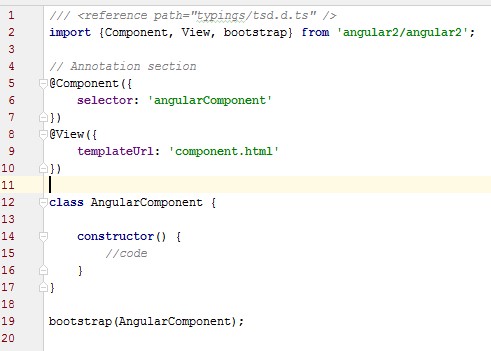
Angular 2 is entirely component based. Controllers and $scope are no longer used. They have been replaced by components and directives. Components are directives with a template. The following code snippet, Listing 1, shows how a component is built. This component is in HTML called with the <angularComponent> tag, the name of the selector within the HTML.
Listing 1
All of the components that are used must be made known via bootstrap. They also have to be imported on the page.
Directives
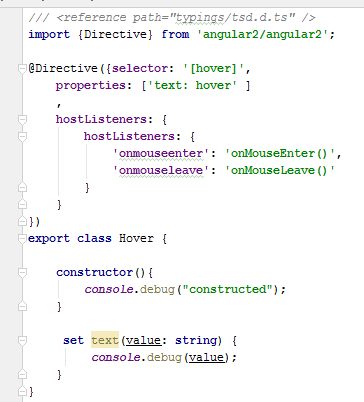
The specification for directives is considerably simplified, although they are still subject to change. With the @Directive annotation, a directive can be declared. This is shown in Listing 2. This is a limited set of possibilities. In the block 'host listeners', standard functions can be linked to their own implementations.
Listing 2
Directives can also be used in components, this applies both to its own directives as predefined directives. For example, the "NgFor" and "hover" directive in a component can be used. These will be imported initially and then made known within the @View.
Dependency Injection
Because of the improved dependency injection model in Angular2 there are more opportunities for component / object-based work. The dependency injection consists of 3 parts. The Injector, which contains the APIs to inject the dependencies and make dependency injection available. Bindings make it possible for dependencies to be named. Finally the actual dependencies of the object are generated so they can be injected.
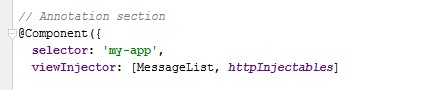
At the moment, an object is passed into the constructor of the component, this only needs to be passed through the injector view, as shown in Listing 3. The objects that are enclosed in the square brackets can then be used to inject.
Listing 3
Some extra annotations have been added which can enhance the possibilities of dependency injection, for example the @InjectPromise annotation. With this annotation asynchronicity can be achieved, and the object is only injected as it actually has been created. At this moment a specific Promise object will be injected. With the @optional annotation, an optional value or library can be injected.
An example of dependency injection is the following declaration:
A special application of dependency injection is HTTP. Through the use of the httpInjectables, which exist in the angular/http package, a HTTP object can be injected. On this object, REST operations can be performed. For the example, a public test server with a REST response has been used. It can be called like this:
What is TypeScript and What are the Benefits of ECMAScript 6
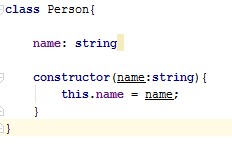
EcmaScript 6 has classes, a typical example of a class is (Listing 4):
Listing 4
In previous versions of ECMAScript, everything was still defined by a prototype. Now classes are defined and it makes it almost as readable as Java code. ECMAScript 6 also has full inheritance. With super (parameters) to the constructor of the parent is called. Furthermore, static variables can be declared.
TypeScript is an extension of ECMAScript, in fact:
TypeScript = ES6 + Types + Annotations
TypeScript is actually from Microsoft, which means the new Angular is also likely to be popular for .NET developers. TypeScript is a form of JavaScript which knows types and classes and can be compiled to JavaScript. It is open source. TypeScript includes many aspects of object orientation such as inheritance and interfaces. It also has generics and lambdas.
Because Angular2 uses TypeScript, the functionality of TypeScript itself and its libraries can be used. Angular is just a framework which couples different features. Other libraries can easily be used. For example, you can use the MongoDB interface because it already has a connector in TypeScript.
WebSockets is another feature that is not directly something from Angular2, but it can easily be implemented and support has been added to the specification. We can define a WebSocket like this:
varsocket=newWebSocket ("ws: // localhost: 3000);
On the socket we can receive messages by defining an onMessage() function. We can also emit changes. If we build a WebSocket server we can get real-time changes.
TypeScript will not be used in the browser. The program code is compiled to JavaScript. This can be achieved with “Traceur”. Because the JavaScript ECMAScript 6 specification has also needed an additional plug-in to be used because the browsers are not yet suitable for this purpose.
Generics
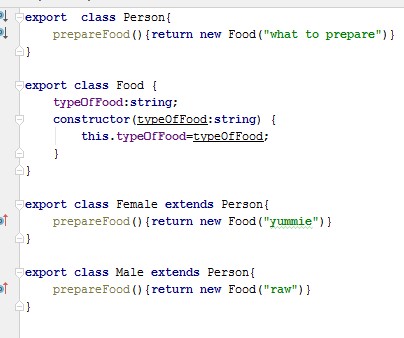
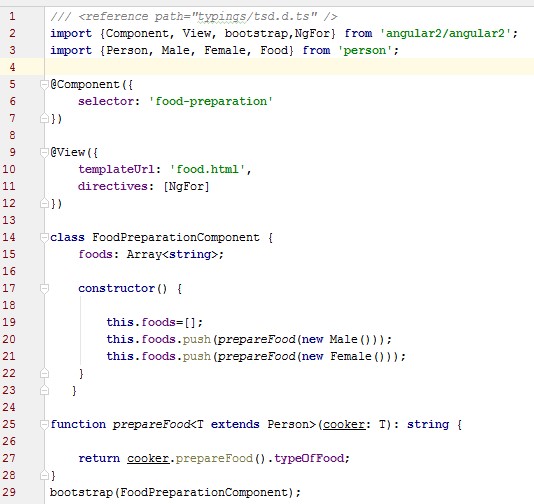
TypeScript has generics which can be used in the frontend. As an example uses a Male and Female class which are both derived from Person (Listing 5). Both can prepare Food, however, the result is different. One only seems to be able to prepare raw food and the other can make delicious food.
Listing 5
In Angular, every class or directive that is used in a component that must first be imported in the component before it can actually be used. In listing 6, the NgFor directive has been imported to use all classes for the generics.
Listing 6
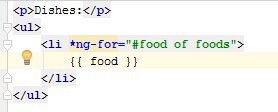
The "foods" list is now displayable with Angular, the following piece of HTML has been used:
Listing 7
The browser then displays a list. This example is relatively simple, later when we discus Forms we will see more advanced options will be possible.
Lambdas with TypeScript
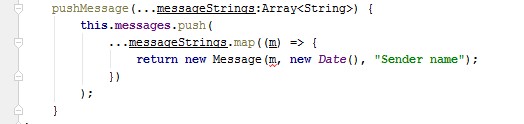
In TypeScript, lambdas are available. The following piece of code makes of every string in messageStrings a new message with this string as content. The string is than pushed in the messages list.
Listing 8
Another application of lambdas is the HTTP GET. Http get supplies a not-directly-usable object, but a RxJS subject. With help of the toRx() method, we can transform it to an Observable. After this we can subscribe to this observable by using the .subscribe. Every change can now be mapped.
Forms and Validations
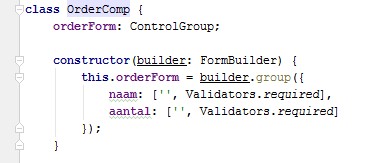
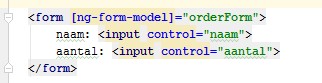
Forms and validations are an important aspect of frontend development. Within Angular 2 the Form Builder and Control Group are defined. The Control Group consists of a list of Control. Listing 9 shows how two fields are added to the Control Group. Each addition is a Control and as could be written as new Control();
Listing 9
The empty field is the initial value, but this can of course also use a value from the database. Next, this can be called in the HTML like this.
Listing 10
Now we can access the errors of each control like this, "<<this.orderForm.controls.naam.errors >>”.
We can also define ControlGroups within ControlGroups, this allows validation of fields on Form level, on validation is on Form level as being a control group, the next nesting contains the actual controls. This validations can then be invoked with “<<this.orderForm.errors>>".
Each Control or validation can have its own implementation. This makes it possible to build your own library with personal functions and controls. Reuse will be easy to achieve. Combined with generics and inheritance it is possible to define a date which uses a rule with generics. Now with inheritance and different types of rules it’s possible to define a pallet of controls. For example, the generic rule is the date is the right size, the line added with generics, the date must be at least 18 years in the past.
Also the Forms and Controls still undergo changes and it is expected that more standard operations will be included.
More Possible
At this moment, not all specifications are fully implemented and are still changing. The direction is very clear, but at this moment, a minor release could cause a failure in your code.
It’s a big step forward that the frontend is now completely made of components and directives and can use all the features from other JavaScript libraries. Is it easy to communicate with the database and make use of WebSockets. It has also become a better way to create directives and components that are very easy to integrate with other frameworks. It is no longer a typical JavaScript framework, it is compiled to JavaScript, but in fact, every language may be used if it can be compiled to JavaScript.
The combination of Angular2 with TypeScript provides a big opportunity in object oriented programming in the frontend. The declarative nature makes it much clearer.
All of this looks very promising and probably will change the way we develop frontends. We probably need to wait until all frontend implementations are finished.
Angular 2 is around the corner and there are mixed opinions about it. Some people can’t wait for it and other people are not any happy with it. Why is that? People are afraid to change, thinking that they wasted their time learning something that is now going to change in a radical way.
Angular is a great framework, but it is 6 years old, and that for a framework is too much. The web evolved a lot since Angular inception in 2009 and the Angular team can’t simply implement those new stuff without breaking half of the actual implementation.
So if they have to break Angular to be able to make it “modern”, it is better to write it from scratch. How so? Angular itself has other problems like the complex syntax for directives, 5 types of services that confuses new users, writing stuff in the wrong scope…
They decided to kill 2 birds with one stone. A new simplified Angular with all the new stuff like shadow dom and also none of the Angular 1 problems.
So my friend, don’t worry, Angular 2 will rock.
Module loader
In Angular until recently, we always had a problem with module loaders. What should I use? Maybe the classic way of endless script tags? Require.js? Browserify / webpack?… Angular 2 uses the standard System.js which is a universal module loader that loads ES6 modules, AMD, Common JS…
Now with this module loader, we just need to import the file where we bootstrap our app, and we are good to go:
Thanks to our module loader, we now see where this bootstrap and App comes from and also, we don’t need to create a <script> tag for every javascript file in our application. Ah, this also means, no more ng-app.
There are more advantages that we will see soon.
Components
In Angular 2, we don’t have controllers nor scope anymore. So… what do we use to create a page like login or home ? We use a Component. What’s a component? In Angular 2 we have two types of directives. The ones that adds behavior to a DOM element and the ones that has an embedded view (template). The first one are called directives and the second one are called components.
Ok, so a component is a directive that has a template and that is what we use to represent a page in Angular 2. A component is simply a class:
123
classMyComponent{}
What makes this class a component? In Angular 2 we have annotations. Annotations are a way to add metadata to a class. So there is an annotation called Component which we can use to say that a particular class is a Component:
Yay, now our component is usable in our html using the selector name we gave to it. And please notice that we didn’t use myComponent as the selector. That is useful.
Ok, but a Component needs a template. There is another annotation called View which is used for the template:
So now MyComponent is a component that responds to my-component selector and outputs a template with a Hello, World.
We can have more than 1 View annotation in a component. We could define a template for desktop, one for tablets, one for mobile, one for tv…
Also, since using a View annotation was mandatory, they decided to merge all the View properties into Component. So in the cases that you only have one view, you can do:
We used the class constructor to set a message. No more scopes.
And that is how we create our pages. When we use the new router, we just need to pass a component to it instead of the old template+controller.
Directives
So how do we create a directive in Angular 2?
123456
@Directive({})classTooltip{}
As we did with Component, we use an annotation to define our directive.
In Angular 1 we had the DDO (directive definition objects) which we used to develop our directive. The problem with the DDO is that it is a bit confusing with stuff like:
transclusion: What does that word even mean?
controller vs link: When to use link and when to use a controller?
compile: What should I do in there?
scope: scope: false, scope: true, scope: {}. Which one to use and why?
Directives in Angular 2 are much simpler and straightforward. Let’s create a simple tooltip (it will just log into the console instead of showing a popup).
First, what do we need to actually use a directive? a selector. In Angular 1 we had the restrictproperty, in Angular 2 is way more flexible. We can use:
foo: that will restrict for an element.
[foo]: that will restrict for an attribute.
.class: that will restrict for a class.
input[type=text]: that will apply this directive only in <input type="text">
There are more ways to define a selector than those 4.
Alright, we just need it to be an attribute, so:
123456
@Directive({selector:'[tooltip]'})classTooltip{}
A tooltip needs a text do display, right? Makes sense to just use the tooltip attribute to pass the text, something like:
1
<divtooltip="foo">...</div>
In Angular 1 we could use an isolated scope or maybe grab the tooltip attribute in the linkfunction and assign it to the scope.
In Angular 2, we have a two different things. We have inputs and outputs. In both cases, they are annotations as well. The input annotation is used for what we give to the directive, for example:
1
@Input()foo;
Here we say that we can use an attribute called foo and what we pass to it will be assigned to thatfoo variable. If the attribute name and the variable names doesn’t match, we can pass a parameter to the input annotation. Let’s see how can we use it in our tooltip:
Here, we are saying that we want the tooltip attribute to be mapped to this.text.
Lastly, it needs to trigger on mouseover. Alright, so a .on call on the element like we used to do? No. We just need to set a listener for the directive:
I think it is pretty clear, isn’t it? On mouse over, we call the show function. And that is it. That is our first directive. We will explain why the parens around mouseover in a bit.
They require you to define some properties, but they are much easier to understand than the counterpart in Angular 1:
The Component (and View) annotation has an array called directives where we list all the directives we want to use in our template. Here we imported the class Tooltip and we listed it on directives.
Wait a second… does that mean that if I use 10 directives on my template, I need to list all of them? Yes. How is that cool? We won’t have more collisions. Let me put an example: In Angular 1 we have two implementations of Twitter Bootstrap, ui-bootstrap and AngularStrap. They both have their issues. Imagine you use ui-bootstrap on a daily basis but then find that the tooltip is not enough for our purposes and then we discover that AngularStrap has a better tooltip. You pull that library in and you use its tooltip.
Wait a second… They both have a directive called tooltip. Which one is going to be used in our template? Both and there is no way in hell you can avoid that.
Now in Angular 2, imagining that we have a port of both libraries, we could do something like:
Both ui-bootstrap and AngularStrap fixed this issue long ago by prefixing their directives, but in Angular 2 even when that is still recommended to prefix your directives, the end users won’t have to deal with your bad decisions.
That being said, all core directives are accessible by default.
$apply() what’s that?
Dollar apply, well, I would like to apply for some dollars. Jokes aside. How many times did you forgot to use $apply()? Checking our code for hours to then realize that we forgot to use $apply() and our bindings weren’t updating.
Here we are using the built-in setTimeout to change our message. Does it Work?
Of course it does. No more fear when mixing Angular with “non angular” stuff.
We get this feature thanks to Zone.js (Thanks to my good friend Wesley Cho for pointing that out).
Properties
This is complex subject and I hope I can explain it properly.
When we write our html, for example:
1
<inputtype="text"value="foo">
The browser will parse the input element and create a node object. Then it will start parsing each attribute to create a property inside that object. So we will end with a node object for the input with the type and value as properties (among others).
If we write on that input again, the value property will be updated but the original value attribute will not. That attribute was used just to initialize the node object.
If you used the <img> tag in the past, you found this issue:
1
<imgsrc="{{foo}}">
The browser parse it, and will try to fetch the image called {{foo}} and then when the angular runs, it will interpolate that {{foo}} so the browser will be able to fetch the image this time. To fix that, the angular team created ng-src. The browser doesn’t know what it is, so it is angular the one who will create the src property with the correct value.
We have this same issue with other directives like ng-class, ng-show, ng-hide, ng-bind, etc. Again, we have a bunch of directives that will prevent the browser from creating “broken” properties by creating the properties themselves with the correct values.
In Angular 2, we can write to those properties directly, that way, we won’t need to create all those directives. How can we do that? For example:
12
<img[src]="myImage"><div[hidden]="isHidden">This div will be hidden if isHidden is true</div>
Using the [] we can write to those properties directly. We want define the src based on this.myImage ? we write that value directly to the property (which is exactly what ngSrc does). We need to hide a div conditionally? There is a hidden property in HTML 5 we can use for that. All of those, without any extra directive.
An attribute only accept strings, but a property accepts complex models. This mean that in the past:
1
<my-directivefoo="{{something}}"></my-directive>
We used to do this to pass the content of something on the scope to the foo attribute. Now that we can write directly to properties, we can do:
1
<my-directive[foo]="something"></my-directive>
No more interpolation because we are now writing to the property directly. Remember our tooltipdirective?:
What is that doing? Is it calling user.name() from the scope to assign a value to the selectproperty based on a name parameter? Or is it a callback function that will be executed from inside our directive? We don’t know and there is no way we can know that without checking myDirectivesource.
Angular 2 introduces a new syntax for this events, also called statements:
That will use the click event of the DOM, no more wrappers around that. As an extra, if that doSomething doesn’t exist, angular will throw an error.
For this one you will need to check the console to see that the second <p> will trigger an error.
Also, you will now understand this code from the tooltip:
123
host:{'(mouseover)':'show()'}
It is an event after all ;)
References
Imagine we want to focus an input by clicking somewhere, something like:
1234
<p(click)="...?"> Focus the input
</p><inputtype="text">
How can we reference this input? In Angular 1 we could create a directive for the input that would $watch for changes in a variable to focus the input. Sounds complicated. In Angular 2 we can create a reference to a particular node which will be local to the template. For example:
1
<inputtype="text"#user>
With #user, we are simply creating a reference to the input, so now we can do stuff like {{user.value}} to see its value or even {{user.type}} to see the type of the input. In short, we now have a reference to the node object in the template. Thanks to that we can simply do:
Here we are using the new ng-model. If we remember from an early point, with [foo] we set some property in our directive, and with (foo) we can fire some event (for example, send a value to the parent). With this example, we are setting name to be the value of the ng-model using [ngModel]="name". Then we are creating an event to update the name in the parent with (ngModelChange)="name=$event". That is good but verbose. Angular 2 let us mix them both like [(ngModel)]="name" so we are actually doing two-way databinding!.
Services
Let’s create a service to fetch users at Github. What should we use? A Provider? Service? Factory? Value? Constant? I am just kidding. No more service vs factory or value vs constant (to this day, I don’t understand why it is called a constant if it is not constant).
A service in Angular 2 is simply a…
123
classGithubNames{}
Class! You guessed it correctly.
Angular 2 has a service for http, but for the sake of showing how to use a third party library, we will use the new library that comes with ES6 called fetch.
The syntax used in here, is just a syntactic sugar for the injector and it uses TypeScript typing to achieve that. It is something like: “Hey, we are injecting the class GithubNames, create a instance for me and call it github”.
Alright, now we have GithubNames injected and saved in our class.
We just need to use it. For example, let’s create a function that will populate the users:
That will call our service and assign the users to this.users. Again, no more $apply even whenfetch is not part of angular.
Let’s iterate through those users:
123456
<button(click)="fetch()">Fetch users</button><ul><li*ngFor="#user of users"> {{user.login}} <img[src]="user.avatar_url"height="50px"></li></ul>
Uh, that is our new ng-repeat and that #user sounds like the reference we created before. Thanks to that, we can reference user inside the <li>.
The * for ng-for is another syntactic sugar. No need to dig in that for this article.
Overpowered outlets
In Angular 1 we have ngView and uiView to mount our views and they are cool, but now with Angular 2, we can get the new router router-outlet and extend it, yes, literally:
123
classMyOutletextendsRouterOutlet{}
No more weird $decorators.
Ok, but what’s the point, what can we do in here? We can create a new outlet that will prevent unregistered users to access certain parts of our applications:
12345678910111213141516171819
// We specify that this outlet will be called when the `loggedin-router-outlet` tag is used.@Directive({selector:'loggedin-router-outlet'})// We inherit from the default RouterOutletexportclassLoggedInOutletextendsRouterOutlet{// We call the parent constructorconstructor(viewContainer,compiler,router,injector){super(viewContainer,compiler,router,injector);}canActivate(instruction){varurl=this._router.lastNavigationAttempt;// If the user is going to a URL that requires authentication and is not logged in (meaning we don't have the JWT saved in localStorage), we redirect the user to the login page.if(url!=='/login'&&!localStorage.getItem('jwt')){instruction.component=Login;}returnPromiseWrapper.resolve(true);}}
So in this case, we created a new directive that will extend the RouterOutlet one. The interesting part in here is the canActivate method, in there we grab the current url and if it is not the /login one and we are not authenticated, we won’t allow the user to go there and we mount the Login component instead.
Thanks to that, we have a much prettier way to manage authenticated users other than listening to route changes events.
Note: I am not entirely sure if this example works with the latest angular 2 version.
Conclusions
Angular 2 is the right step forward. It is way simpler than Angular 1. No more controllers, no more scope inheritance that drives us insane, the directives API is much easier to understand than the actual DDO. No more $apply, and the best of all things, thanks to [properties] and (events) we removed like 30 directives that are not needed anymore and apart from that, we simplified the way of consuming directives.
On the other hand, there is no more 5 “different” types of services, so we just need to create a plain ES6/TS class and write methods on it.

 Listing 1